 tyde
tydeGetting started / 01
Using Tyde
Learn the interface and the terms used in this guide. Start here with Tyde installed and open.
This guide assumes Tyde is installed and open. It covers desktop Tyde and access from your phone. Choose a chapter for the task you are doing, or start with a conversation without a project.
Find your way around the window
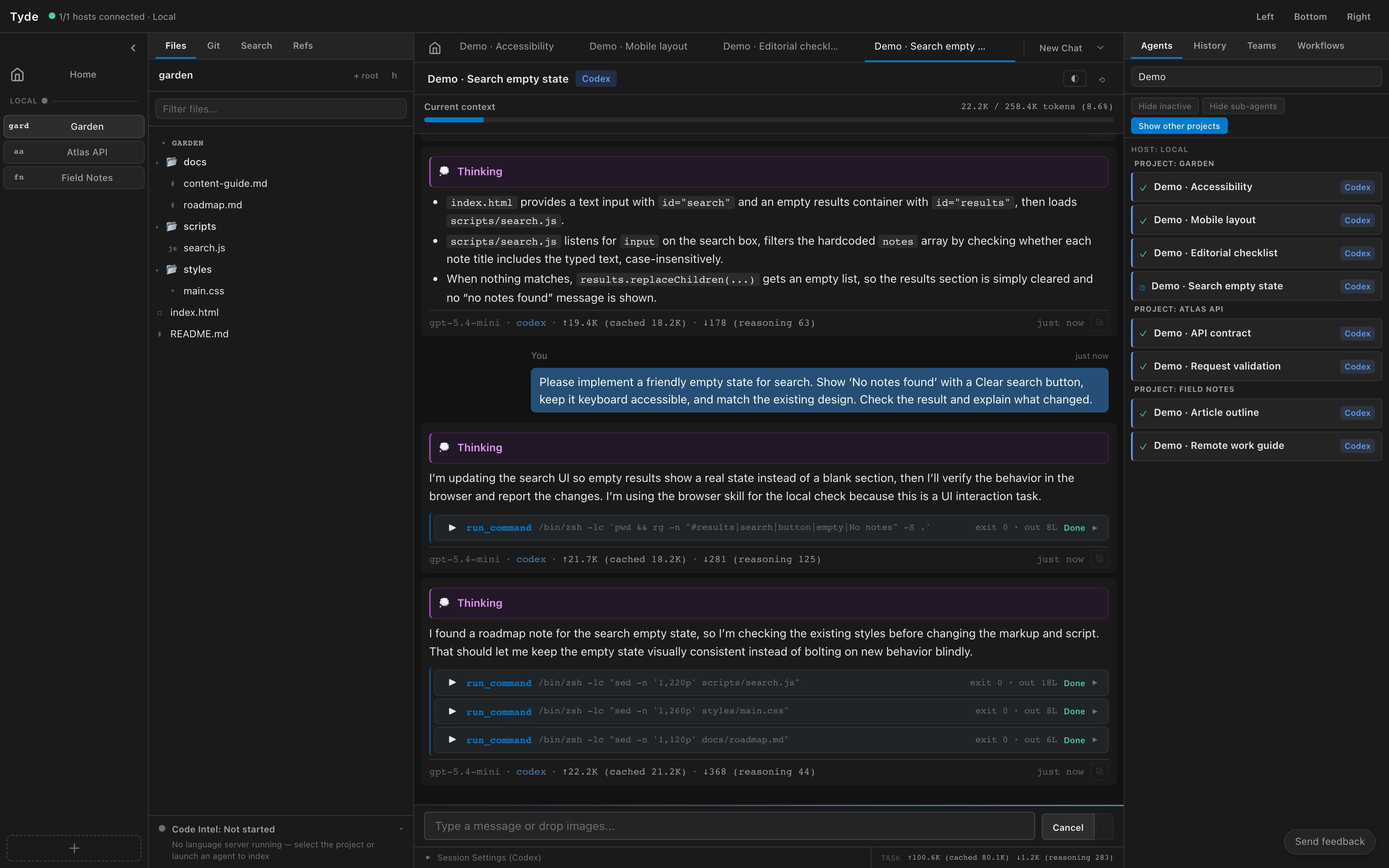
| Area | What you do there |
|---|---|
| Project rail, at the left | Select Home or a project. The selected project determines which files you browse and the context for new project agents. |
| Files and Git sidebar | Expand folders, open files, inspect working changes, and browse commits for the selected project. |
| Conversation and file panes | Read an agent conversation or open source files. Conversation tabs let you return to agents you already have open. |
| Agents and History sidebar | Find active agents or saved sessions. Use the Agents filters to include other projects or hide inactive agents. |
| Conversation composer | Send requests and follow-ups. Responses and tool activity appear above it. |
| Settings | Configure hosts, backends, custom agents, skills, and integrations. Check the selected host before changing its configuration. |
In the screenshot, Garden is selected in the project rail, its folders are expanded under Files, and the center pane shows an agent reading files for a search change. The Agents sidebar also includes agents from Atlas API and Field Notes because Show other projects is enabled.
Terms used in this guide
| Term | Meaning |
|---|---|
| Host | The machine running Tyde’s server and the agent processes. The local host is this computer; a remote host is another machine you connect to. |
| Backend | The CLI harness running a conversation, such as Claude or Codex. It supplies the available models and backend-specific session options. |
| Project | A named workspace on one host with one or more root folders. Git roots have their own working changes and commit history. |
| Agent | A conversation backed by a harness. It may be working, waiting for input, or idle. An agent can start with or without a project. |
| Session | The saved conversation listed in History that you can resume later. |
| Custom agent | A saved configuration of instructions, skills, and tools used when launching an agent. |
| Workbench | A project derived from another project’s Git roots, with separate working trees and branches. |
Choose a task
- Start a conversation and learn the response, tool, and follow-up controls.
- Open code in a project, then review its changes.
- Find and organize agents, or resume an older session.
- Connect another machine and work with its projects, or pair your phone to access the same agents.
- Configure custom agents and skills, then use subagents.
- Use Settings reference or Troubleshooting for a specific control or problem.
Controls and available options can differ by host and backend. Instructions that say to select a host refer to the machine whose files, agents, or settings you intend to use.